




Part 3: Protecting a Fleet´s Priceless Data
Malicious cyber attacks, equipment failures, and natural disasters can destroy data protected by even the best security systems. Precautions must be taken to keep data safe in any situation.
By far the most valuable portion of a fleet information management system (FIMS) is the data itself. Hardware and software can be replaced but your priceless data may be lost forever if precautions aren’t taken on several fronts. Protecting your data requires a combination of hardware, software, procedural discipline, and constant vigilance.
As the third part of the IT for Fleet Managers series about computer and networking security, this article is intended to provide enough background for fleet managers to participate intelligently in decision making processes with their information technology (IT) experts and fleet software vendors to ensure that fleet data is kept safe.
“Is it Safe?”
In a classic scene from the 1976 movie Marathon Man, Dustin Hoffman’s character is tortured with dental tools by a maniacal ex-Nazi played by Sir Laurence Olivier as he is asked repeatedly, “Is it safe?” Hoffman has no idea what Olivier is talking about. If you can’t answer that question with an honest “yes” with regard to your fleet data, then you may be in for more professional pain than a root canal without any Novocain.
Ensuring the safety of your fleet data requires implementation of both physical and electronic protective measures. It also requires that you or your supporting IT section/vendor provide for redundancy at key hardware component and data backup points in the system.
Physical Security Measures
Computer hardware components (e.g., terminals, PCs, servers, network devices) need to be protected from physical access by unauthorized personnel. The most basic form of security is to locate this hardware in locked rooms or cabinets or in limited-access areas easily observed by fleet personnel. “Fiddling” by untrained employees or unnecessary use by a bored customer playing online games create the opportunity for system degradation or disruption.
Hardware redundancy can make the difference between your fleet system surviving a common failure without users even noticing and it coming to a screeching halt over a $200 component.
The most critical point for investment in redundant hardware is in the database server. The following areas should be addressed if you operate your own servers. These should be evaluation criteria and contractual requirements if you outsource your IT operation.
Power Conditioning/Backup. Electrical spikes can be common-particularly in older facilities with stressed electrical services. These spikes will damage computer and network hardware, burning out their internal power supplies or worse, unless protected by a quality surge suppressor. Every piece of hardware should be protected by this relatively inexpensive insurance device. Beware, not all power strips have surge suppression circuitry and those that do don’t last forever. Once the indicator shows the protection has been burned away by spikes, buy a new one or the next spike might cook the computer.
When electrical power is interrupted, a computer ceases to function immediately and any data that hasn’t already been transmitted or saved to disk disappears forever. Modern computers are less susceptible to permanent damage from a crash of this type.
Still, servers at the very least should be protected by an uninterruptible power supply (UPS). These rechargeable battery backup units detect the power outage and send a signal to the server to shut-down normally when the outage persists to within a few minutes of the battery being drained. This ensures that all data is safely stored and the server will reboot normally. UPS units also provide surge protection.
{+PAGEBREAK+}
Server Redundancy
Computer servers have some components that will eventually fail as surely as vehicle parts do. Keeping computers clean, dry, and cool prolongs component life but hard disks and power supplies, in particular, are going to fail within a few years. Specifying servers with hot-swappable (i.e., pull and replace while the server is running), redundant power supplies and hard disks lets you survive these failures without disruption.
Multiple hard disks can be configured as redundant arrays of inexpensive disks (RAID) in multiple configurations.
At RAID Level 5, the server automatically stripes data to several disks including error correction information resulting in excellent performance and good fault tolerance. If a disk fails, the others carry the workload without any data loss until a replacement is plugged in and gets rebuilt automatically. Having a spare disk already in the server as a ready reserve allows it to logically remove a bad disk from the array and rebuild the data on the reserve disk seamlessly.
Large fleets and certainly any commercial server provider should have complete backup servers online to take over while the primary is being repaired.
Firewalls and proxy servers insulate and protect network users from the Internet.Electronic Measures
Computer hardware and networks need to be protected from access by unauthorized personnel. While fleet systems aren’t likely targets for industrial espionage or malicious sabotage, hackers are always looking for unprotected computers to slave for spreading “spam” e-mail and viruses, participate in “denial of service” attacks against Internet sites by bombarding them with heavy traffic, and storing illicit files for distribution.
Access Control. The first electronic defense is to implement strong passwords. Generally speaking, longer passwords that include numbers, lowercase letters, and uppercase letters, which are not easily associated with a user are the most difficult to compromise. Passwords should be changed periodically. However, forcing users to use passwords too difficult or changed too often to remember invites trouble. Many users faced with a strict password policy will write them down and make it simple for someone with physical access to their work area to log onto a computer and gain access to everything that user can access.
Alternatives to password use are card/key readers or biometric devices that read distinctive employee characteristics, such as fingerprints or eye retinas. These devices are steadily improving and becoming less expensive so they may be a viable alternative for your network, especially if it is linked with highly sensitive parts of your parent organization.
Wireless networks add an additional level of security vulnerability because you don’t have to physically connect to a network to gain access to it. Routers and access points that broadcast and pick up wireless fidelity (Wi-Fi) signals should never be fielded with their default setup.
At the very least, the administrative setup password should be changed and their highest level of wired equivalency privacy (WEP) encryption should be turned on (128K key or better). Changing broadcast channels, the service set identifier (SSID), and even turning off SSID broadcast are also advisable. The SSID is the unique name of a wireless local area network (LAN) and serves to tie multiple access points together.
Another fundamental security issue is to determine what employees actually need access to and what they need to be able to do with the data. Limiting access to shared files and fleet software functions limits risk. For example, if all a technician needs to do is look at a vehicle’s “birth certificate” information (e.g., year, make, model, VIN, engine size), then give them view-only privileges, not the ability to change it.
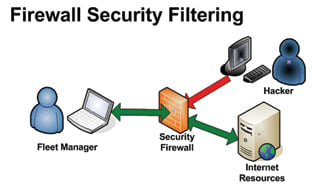
Firewalls/Proxy Servers. Firewalls can be implemented as either hardware or software, or a combination of both. A firewall is the first line of defense for any private network or intranet connected to the Internet. It filters everything that enters or leaves your network and protects individual computers using various techniques and criteria to block potentially dangerous data traffic.
A proxy server acts as a buffer between your network and the Internet effectively hiding network addresses from the Internet. It serves to speed response times when multiple users wish to access the same Web page by storing a copy of the page in cache for a time. More importantly, a proxy server can control access to the Internet by filtering requests and disallowing access to certain Web sites or types of Web sites.
{+PAGEBREAK+}
Anti-Virus/Ad Ware. Every computer connected to the outside world today must use anti-virus software to help protect it from malicious programs sent via e-mail, Web sites, or data disks. Furthermore, anti-virus software must constantly be kept up-to-date via on-line subscription services - even then, some threats spread faster than their cures become available.
At a minimum, “Trojan horse” programs, “worms,” keystroke logging viruses, and “ad ware” slow down your computer and network access. Ad ware tracks the Web sites you have visited and pops up unwanted advertising. These programs may be sharing your private information, spreading themselves to others using your computer, or incapacitating your computer at worst.
Corporate versions of anti-virus software “push” program and virus definition updates to client PCs from an anti-virus server. They also permit running system-wide virus sweeps of all managed computers on an automated schedule. Initiating a sweep manually after a major update is a good practice to catch anything previous anti-virus versions may have missed while in auto-protect mode.
Most viruses take advantage of vulnerabilities that have mistakenly been created in computer operating systems, Web browsers, and other software. Keeping this software updated from publisher Web sites reduces the number of vulnerabilities of which malicious code can take advantage.
Likewise, keeping firmware (programs written onto internal hardware chips) in computers and network devices helps close other vulnerabilities and improve system security.
Redundant, hot-swappable devices in critical hardware keeps the network humming while awaiting repairs.Disaster Recovery
The most important step you can take to ensure your fleet data survives everything from hardware failures and attacks from the latest virus to natural disasters is to BACK UP YOUR DATA! Everything in your computer system is replaceable, except your data. If you take nothing else from this article, at least be sure to make backups of your data daily and store multiple copies in multiple geographic locations.
Religiously backing up your data is insufficient if you store the backup on another computer or tape in the same room with your server. You would be protected from hardware failure and maybe virus attack. However, a fire or storm that destroys your building would also destroy your backup data.
Backups are traditionally performed during off-peak hours using specialized software to mirror data onto a backup server and/or copy it to tape cartridge. Tapes can be sent to a remote data vault or taken home at night for safe keeping.
Database exports commonly used to populate training database copies are also useful to put everything in one large file for backup purposes. The file can be copied to a remote server or onto a manager’s laptop using automatic file synchronization. Taking the laptop home at night gives you the geographic dispersion you need to truly protect it. If your data is kept on a vendor’s off-site server, keeping a local backup of this type should be a contract priority.
They’re Watching!
As a final word of caution, you should always consider that anything you store on or transmit from a computer will be seen by the world. Your network might be protected from outside intrusion today but become infected by a new virus tomorrow or your employer could be clandestinely monitoring it from inside all your safeguards.
Networked computers are designed to share information. Given the need to permit this information exchange, the complicated process of software development, and the ingenuity of hackers, a constant war is being waged for control of your assets. Someone could be reading every keystroke you type even if you’ve done everything possible to protect your system.
And then there is Big Brother! A recent CSO Magazine survey of security executives revealed that 74 percent monitor what Internet sites employees visit, 43 percent review e-mail, and 31 percent review computer files. Something you may think is harmless or funny could just cost you or a valuable employee his or her job.
Conclusion
System security is not something you can afford to take lightly or take for granted when someone else is handling it for you. Ask the tough questions. Do what you can to automate security measures so you don’t have to rely on users to actively protect themselves.
Your system security is only as good as the weakest link. So - be careful out there!
More Operations

Who Deserves Fleet Recognition and What Could You Teach at GFX?
Who helped shape your fleet career, and what have you learned that could help someone else?
Read More →
What’s Haunting Public Sector Fleets?
Public sector fleet challenges rarely happen in isolation, and addressing one often means understanding how it connects to another.
Read More →
Is Keeping Older Fleet Vehicles Really Saving Money?
Is keeping vehicles longer saving money, and what happens when a diagnostic test points to the wrong fix?
Read More →
How Smart Fleet Strategy Can Help Local Government Agencies Do More with Less
Keeping a vehicle longer may ease this year’s budget, but what does it cost the next one? A closer look at fleet decisions can reveal opportunities to reduce spending while protecting essential services.
Read More →
Connect with Government Fleet on LinkedIn
From industry news and fleet management strategies to conversations with peers, Government Fleet's LinkedIn page offers public-sector fleet professionals another way to stay informed and connected.
Read More →
Town of Queen Creek Named Most Successful Fleet Award Winner of Inaugural RTA Fleet Success Awards
Five fleets were honored at RTA Connect 2026 in Chicago for excellence across resource efficiency, intentional culture, risk management, and stakeholder satisfaction.
Read More →
A buyer's guide to fleet management software in 2027
Buying fleet management software in 2027 means looking beyond features and price. As fleet operations, technology and expectations evolve, this guide explores what today’s fleet professionals should consider when choosing a system that can deliver value now and adapt to what comes next.
Read More →
Hazard Alerts, Fleet Car Sales Rise and a New Shuttle Concept
Fleet car sales doubled, but the bigger picture tells a different story in this week’s roundup.
Read More →
How St. Johns County Turned Fleet Data Into Better Replacement Decisions
St. Johns County, Florida, had fleet data, but turning it into reliable decision guidance was another matter. Instead of starting over with a new fleet management system, the county connected existing tools and built a scoring system that gives managers an objective look at fleet health.
Read More →
Fleet Forward Conference Introduces One-Day Passes for 2026
New one-day registration lets fleet professionals attend Tuesday, Wednesday, or Thursday, with passes available for $249.
Read More →